 GENIE
GENIEStart here
Introduction
What is GENIE?
GENIE is one board for your trading day: live market cards, a crew of bots, and a line of plain English to tell them what to do.
You type what you want, like “sell a third of my $AI at $259” or “copy this wallet at 20%”. The Genie picks the bot for the job, writes the rule, and reads it back to you in plain words. Nothing runs until you arm it, and nothing spends beyond the limits you signed.
Around that sits the board: cards for new launches, prices, wallets, news and gas that you arrange however you like. There is nothing to install and no config screen to learn first.
Why GENIE exists
Crypto tooling is scattered. A Telegram bot for sniping, a terminal for charts, a separate site for copy trading, another for alerts, each with its own setup and its own way of asking for your keys.
GENIE puts that in one place and lets you talk to it like a person. A casual trader can set a stop and an alert. A launch trader can snipe new tokens with filters and a sell check. Someone who follows good wallets can copy them at a size they choose. It is the same app for all of them, shaped by what they ask it to do.
Your main wallet is only used to sign in. Bots trade from separate bot wallets, inside limits you sign yourself.
Start here
Getting started
Setup takes six steps, and the app walks you through each one.
- Connect and sign in with a wallet. Signing in is a message you sign, not a transaction, and costs nothing.
- Accept the terms and the risk disclosure.
- Create your bot wallets. These are the wallets bots trade from. They are separate from the wallet you signed in with.
- Fund a bot wallet. Only what you put in a bot wallet can ever be traded.
- Set spending limits. How much bots may spend per trade, per day and in total. You sign these with your own wallet.
- Add your first cards to the board.
You can skip ahead with Finish later and come back to it. If you only want to look around first, Look at the demo on the welcome screen opens a board with simulated data.
Using GENIE
How it works
From a sentence to a running bot, in three steps: ask, check the read-back, arm.
Asking the Genie
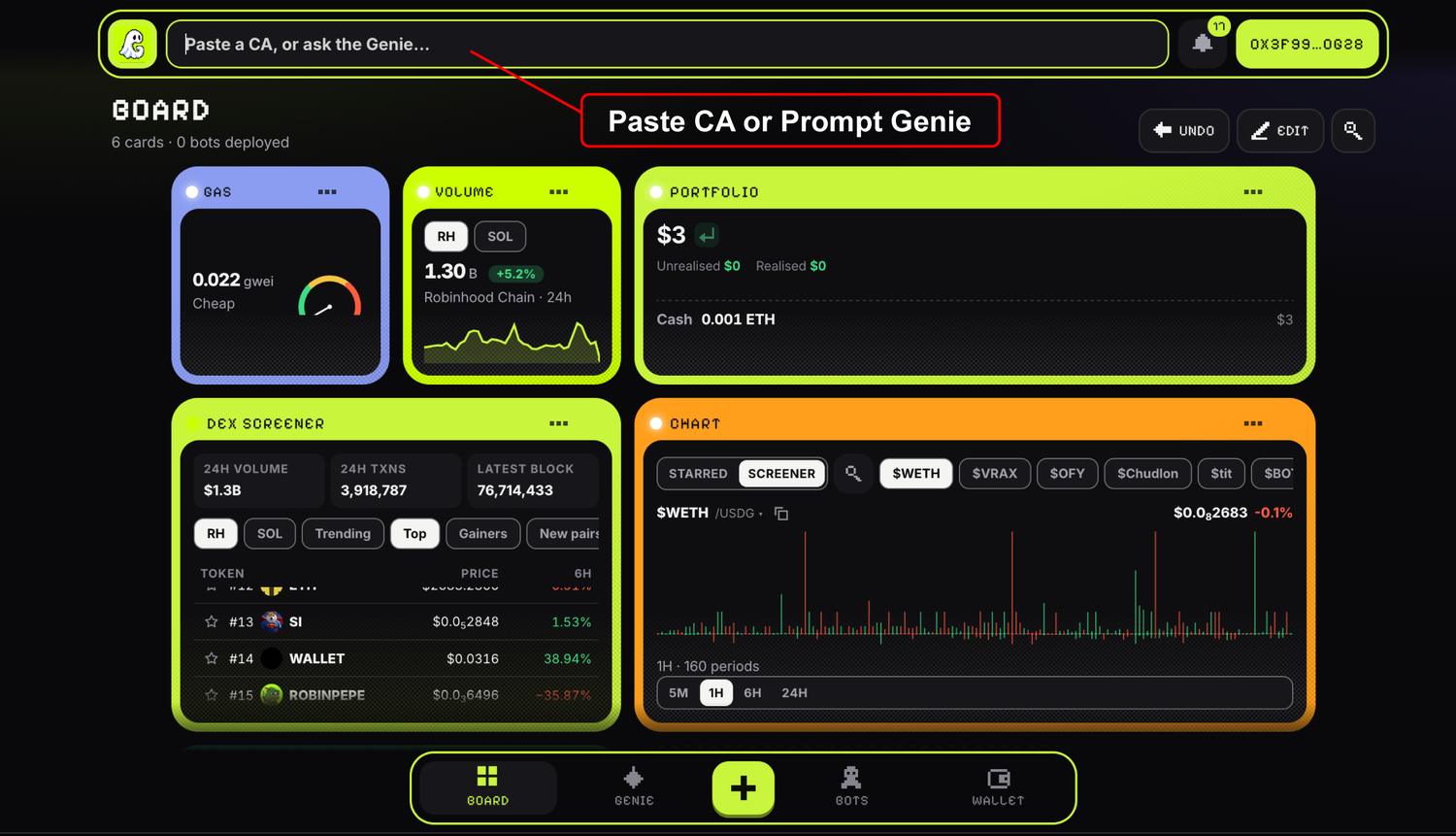
Type into the field at the top of the app, open the GENIE page, or tap the floating Genie. It also has shortcuts for the common things: a swap, a new card, a new bot, pasting a contract address.
Paste a contract address on its own and it opens that token. Type a sentence and the Genie works out which bot should take it.
The read-back
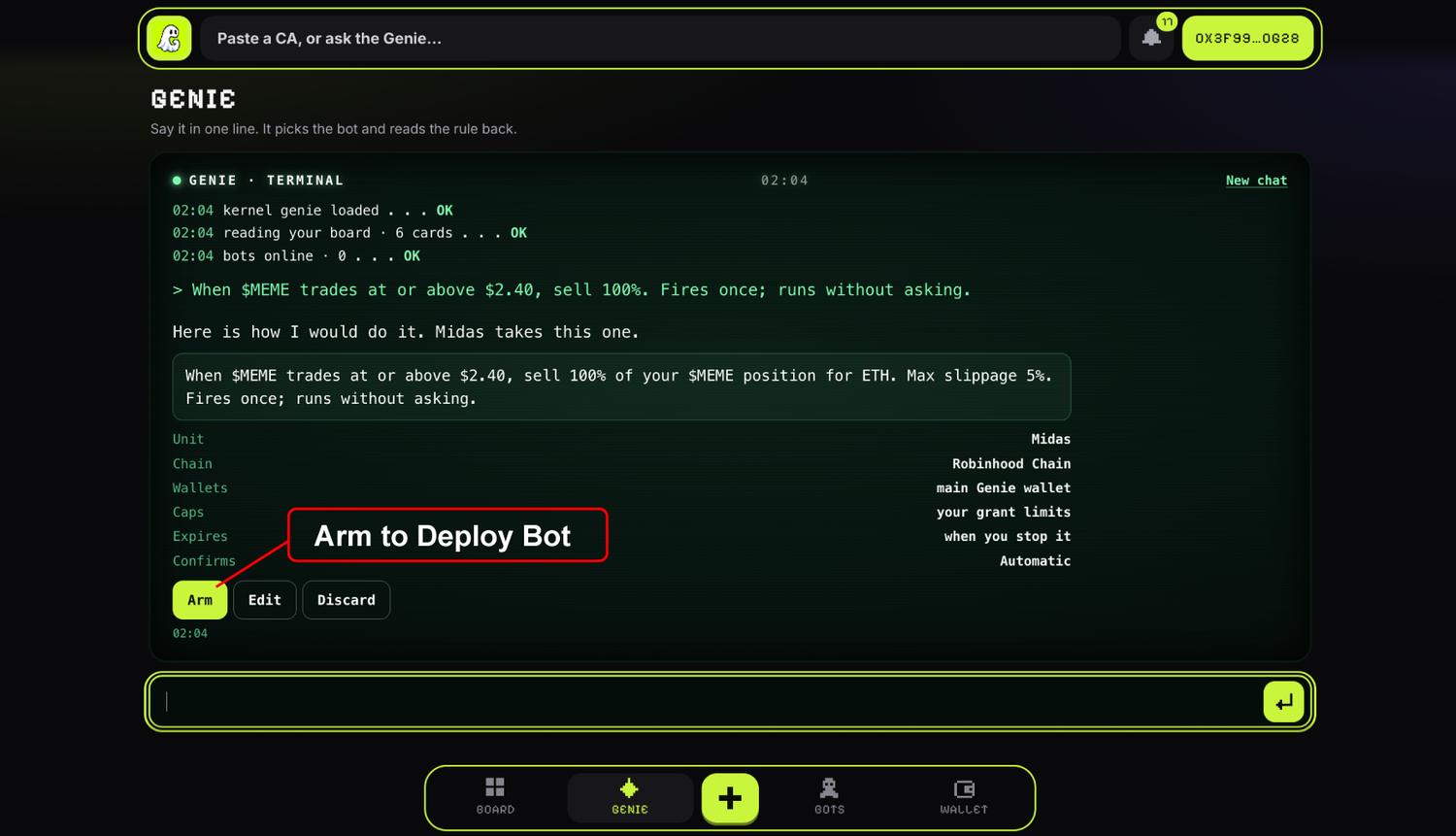
Before anything runs, the Genie shows you the rule in plain words and names the bot that will run it. For example:
When $MEME trades at or above $2.40, sell 100%. Fires once; runs without asking.
That sentence is generated from the rule itself, not written freely by the AI, so it is exactly what will run. Under it you see the scope: which bot, which chain, which wallets, the caps, when it expires and whether it asks you first. If it understood you differently, you see it here rather than afterwards.
Arming and confirming
Arm it, Edit it, or Discard it. Once armed, the rule lives on the Bots page, where you can pause or cancel it at any time.
Each rule also says how it behaves when it fires:
Snipes and copy trades always run on their own, because a question that waits for you would miss the trade. Your limits still apply to them.
If a rule needs more than your current limits allow, the Genie opens the limits sheet with the numbers filled in so you can review and sign them.
Using GENIE
What can you build?
Anything from a single price rule to a bot that watches every new launch. Each rule is one trigger and one action.
GENIE trades on Robinhood Chain and Solana. New launches are read from pons and pump.fun.
How to write a prompt
Say it the way you would say it to a person who can act on it. Most prompts name some of these:
Examples
Every prompt below works as written. Copy one and change the numbers.
1Price rulesLimit buys, stops and take-profits
sell a third of my $AI at $259
buy 0.5 ETH of $PONS if it drops to $0.012
set a stop loss on $AI at $1.80
take profit on half my $HOOD at $400
Midas holds these and fires them when the price crosses your level.
2AlertsTell me, do not trade
ping me when $PONS moves 10% in 5 minutes
just watch what @KETL trades, don’t copy anything
Alerts arrive as notifications and in the bot’s console.
3New launchesSniping with filters
snipe fresh pons mints with 0.1 eth, min liquidity 25k, deployer must be clean
snipe pump.fun graduations under 400k mcap, 0.25 SOL each, dev under 5%
snipe pump.fun mints the oracle scores 85 or more, 0.5 SOL
snipe pons mints once 5 wallets have bought, 0.25 eth
The Wizard buys, timed in blocks. Before every buy the Sentinel checks that the token can be sold back, and blocks it if not.
4Copy tradingMirror a wallet at your own size
copy @ONYX at 20%
mirror this wallet at 10%, max 0.2 SOL per trade
mirror this fomo wallet at 20%, max 0.5 ETH
The Shadow follows the wallet’s buys and sells. Paste an address, or use a fomo handle.
5Big orders over timeEasing in and out
ease into $PONS with 5 ETH over 12 hours
ease 10% out over 2 days, no price impact
spread 1 eth over 24 wallets and mirror @TAPE across them at 10%
Chronos splits the order into slices. It can also spread funds across your own bot wallets, up to 63 of them. It does not send to other people’s wallets.
6NewsAct on a headline
when FOMC news hits, sell half my ETH for USDG, but only up to 1 ETH without asking
if you detect any news of IRAN, WAR or HORMUZ convert ETH to USDG
News rules watch a set of curated crypto and markets news feeds for your keywords. They do not read X or other social media.
7Wallet housekeepingCleaning up after yourself
revoke approvals older than 90 days and sweep dust under $5
The Hobbit finds balances you forgot, claims rewards and revokes old token approvals.
8CardsPut something on the board
show me the top fomo traders this week on my board
Ask for a card and it appears on your board. See Cards you describe for cards that do not exist yet.
Using GENIE
The board
Your home screen: a grid of cards you choose, size and arrange.
Cards
There are around thirty kinds of card: new launches, a DEX screener, swaps, your portfolio, news, gas, top traders, wallet trackers, stocks and more. A new board starts with six: DEX, launchpad, swap, portfolio, news and gas. Add more with the + button or by asking the Genie. A board holds up to 60 cards.
Cards read live data from Robinhood Chain, Solana, pons, pump.fun and fomo. Some let you switch chain with a tab. A card that has no live source yet says so, rather than showing numbers that are not real.
Arranging and sizing
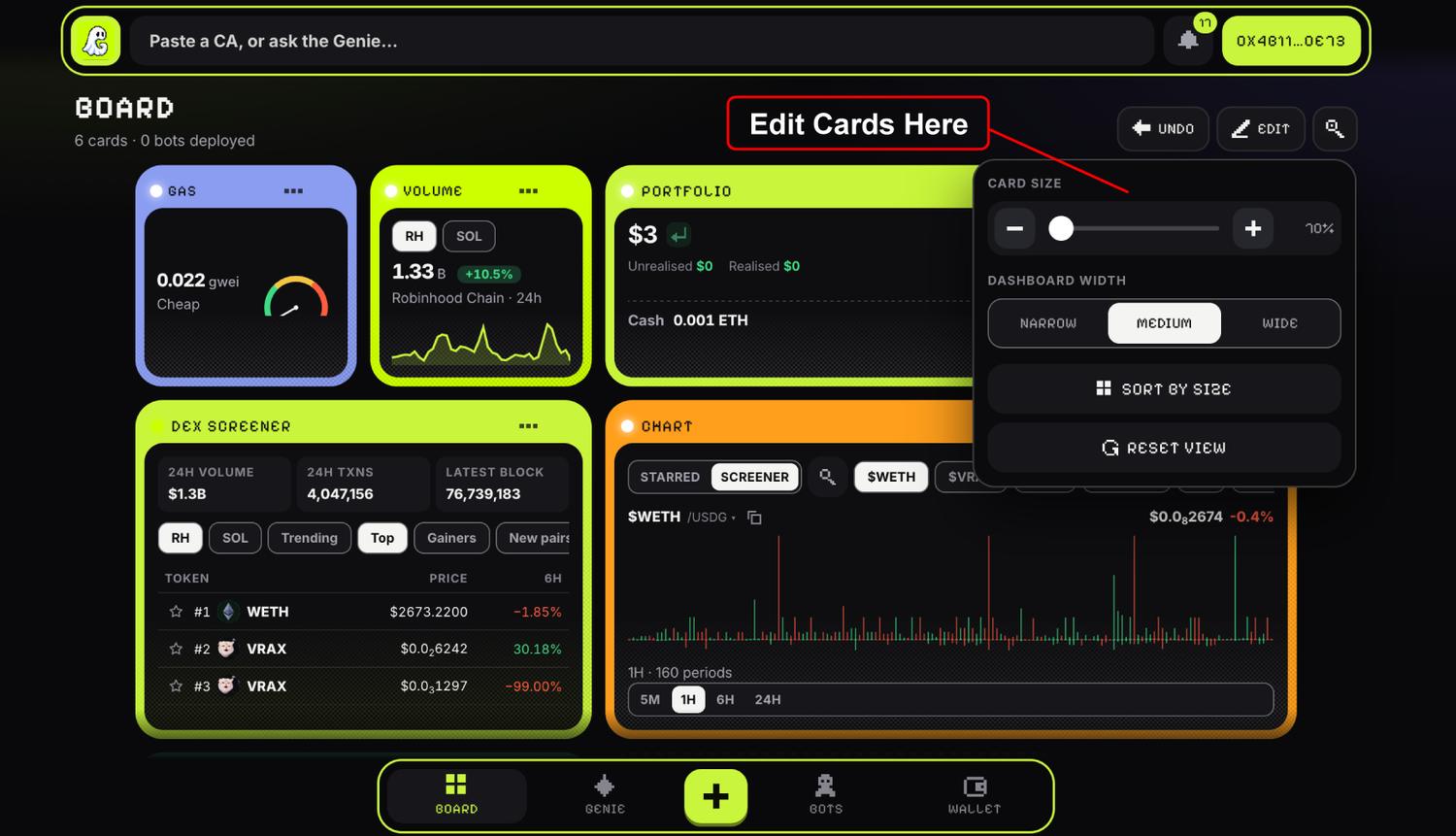
Press EDIT, then drag a card by its title to move it, or use the corner button to resize it. Sizes are counted in columns and rows: the picker offers 2x1, 2x2, 2x3, 4x1, 4x2 and 4x3, and Custom lets you draw any other size.
In settings, Dashboard width sets how many columns the board has (narrow 4, medium 8, wide 12), and Card size scales everything from 70% to 140%. Phones always use four columns.
Your board is saved in your browser, one per account.
Cards you describe
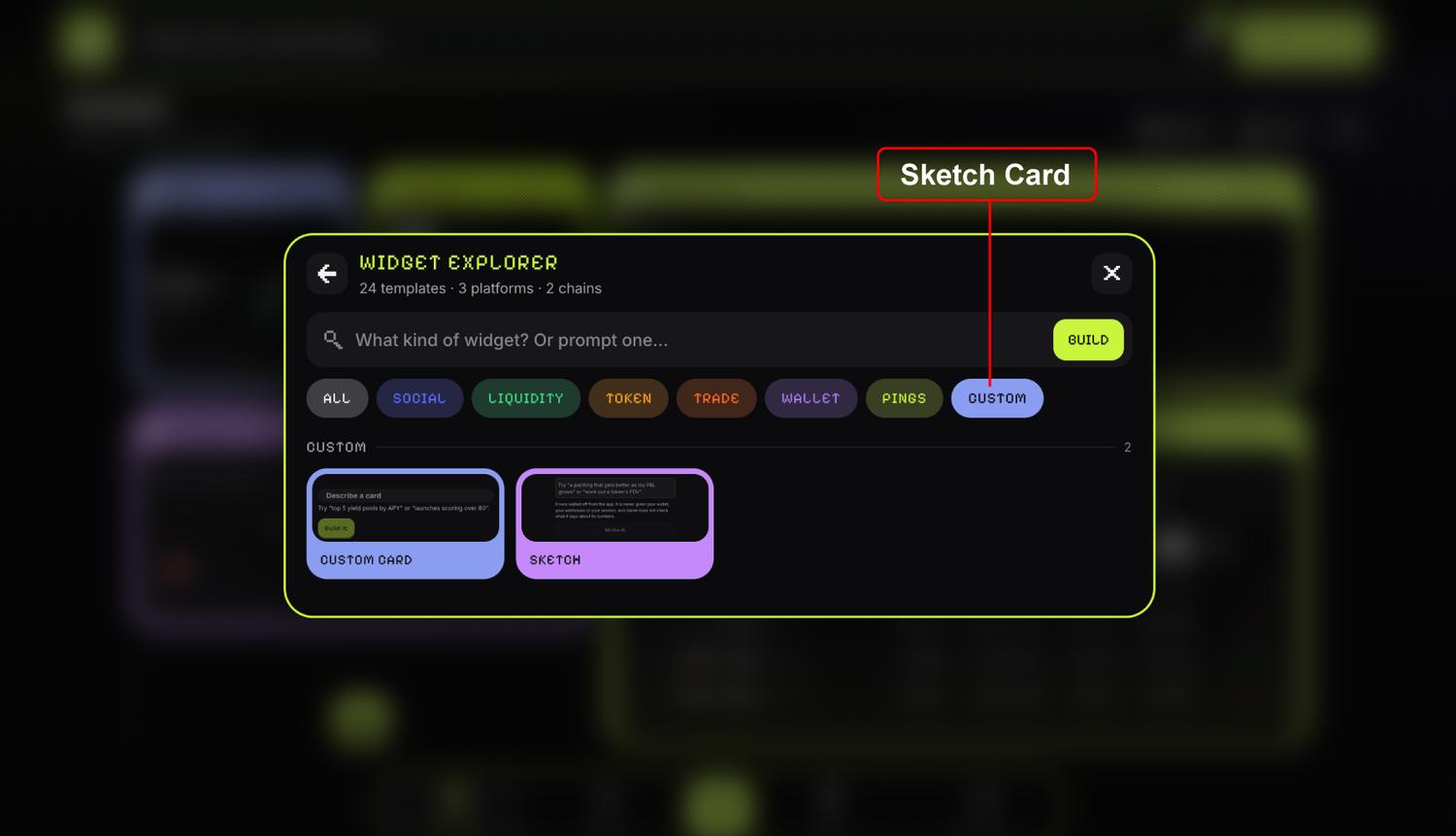
If the card you want does not exist, describe it. A custom card builds a view from your board’s own data using a set of ready layouts.
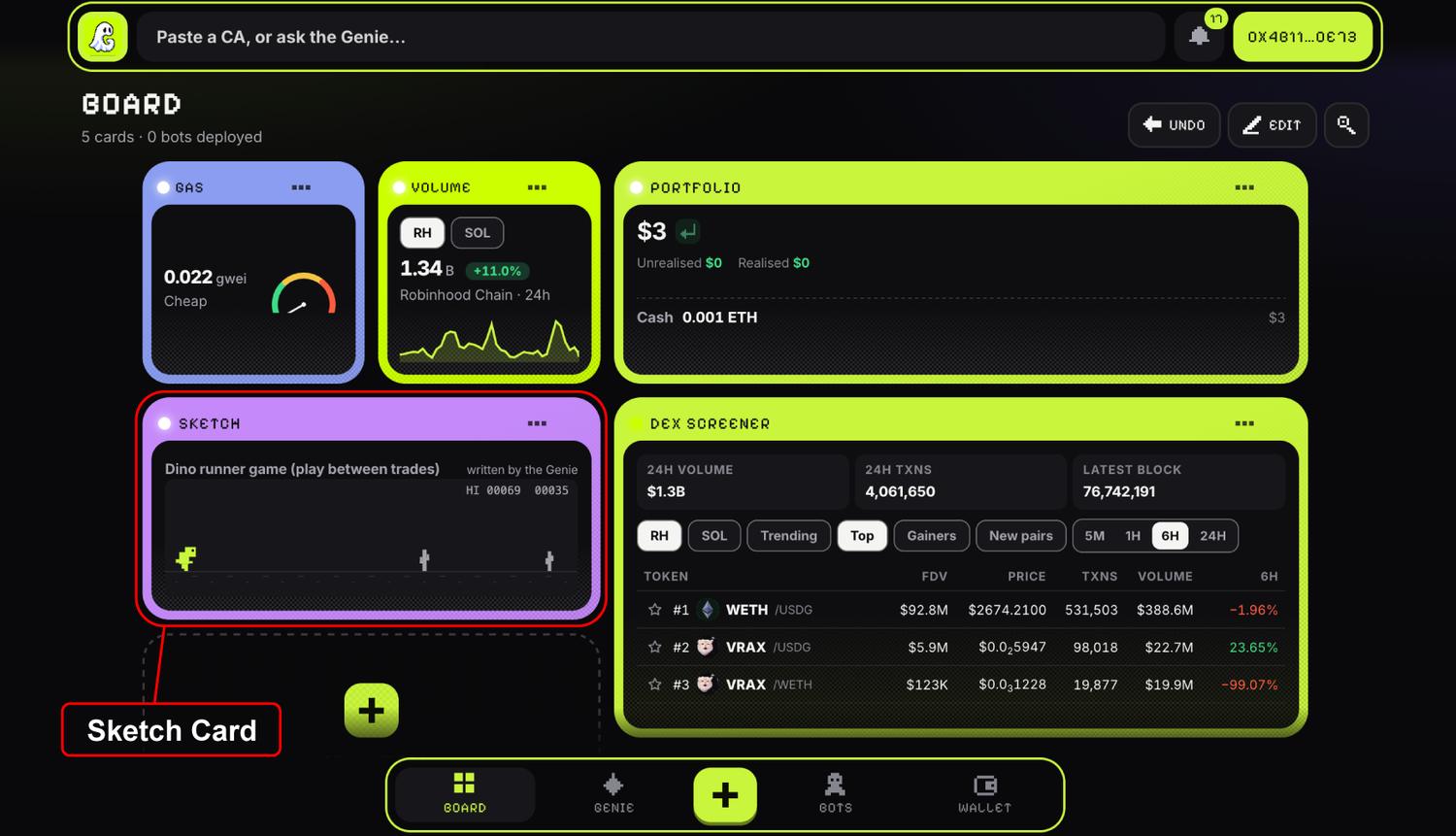
A sketch card goes further: the Genie writes a small program for the card, like a chart, a game or a calculator, while an alchemist brews in the card. Writing one takes around half a minute.
a dino game I can play while trading
A sketch card runs walled off from the app. It is never given your wallet, your addresses or your session, and GENIE does not check what it says about its numbers.
Using GENIE
Bots
Eight bots, each with one job.
The crew
The Oracle and the Sentinel never spend. The others trade only from your bot wallets, inside your spending limits.
Rule states
Every rule on the Bots page shows where it stands:
The console
Each bot has a console: a running log of what it did on your board, including fills, blocked trades, failures and the rules it is running. From there you can configure it, pause it, resume it, or type a new instruction straight to it.
A bot’s own page shows what it decided: how many things it saw, how many matched your rule, and how many were filtered out and why.
Using GENIE
Workflows
Something new is brewing. Check back here soon.
Reference
Safety
Bots can only spend what you let them, from wallets that are not your main one.
Spending limits
You sign your spending limits with your own wallet, and the signer refuses any trade above them. A rule you arm cannot talk its way past them.
Those defaults are for Robinhood Chain. On Solana the default is zero, so nothing trades there until you raise it. Pausing or revoking your limits needs no signature. Raising them does.
Checks before a buy
The Sentinel looks at every buy before it goes through, and blocks it if:
- selling straight back would return less than half of what you put in, which is how a honeypot shows up,
- the expected price impact is over 3%, or
- the top 10 holders own more than half the supply.
It also stops trading for the day once you are down 10% of your bot wallets’ value, and caps fills at 30 an hour.
Your keys
- Your main wallet stays yours. GENIE never asks for its keys. It is only used to sign in and to sign your limits.
- Bot wallets are yours too. You own their recovery phrase. GENIE holds an encrypted copy that it can only use within your limits, and it is encrypted before it leaves your browser.
- New withdrawal addresses wait. An address you add can be used after 24 hours, so a stolen session cannot empty your wallets straight away.
- You can leave at any time. Take full custody sweeps everything out and deletes GENIE’s copy of your keys.
There are also deposit caps while GENIE is new: 20 ETH and 400 SOL per account.
Trading is risky. New tokens can go to zero in minutes, and no check catches everything. Read the risk disclosure before you fund a bot.
Reference
Accounts and pricing
Signing in
Your wallet is your account. You sign in by signing a message, with an Ethereum wallet, a Solana wallet, or both. An account links one of each.
Any browser wallet on Ethereum-style chains works, and on Solana, wallets like Phantom, Solflare and Backpack. On a phone, open GENIE inside the MetaMask or Phantom app’s browser. WalletConnect is not supported yet.
Chains
Bots trade on Robinhood Chain and Solana. You can hold up to 64 bot wallets on each. The Hobbit can also look through your Ethereum and Base wallets for forgotten balances, without trading there.
Pricing
GENIE charges no fee right now. You pay the network’s own gas and swap costs, as you would anywhere.
Token
$GENIE
Allocation
| Allocation | Share | Tokens | Unlock | Purpose |
|---|---|---|---|---|
| Liquidity pool and incentives | 35% | 350,000,000 | At launch | Pool depth and the rewards paid to people who provide it. |
| Treasury | 25% | 250,000,000 | 3 month cliff, then 18 months linear | Runway and anything the protocol funds later. |
| Private raise | 10% | 100,000,000 | 50% at launch, then 3 months linear | Capital raised before launch. |
| Ecosystem and listings | 10% | 100,000,000 | 25% at launch, then 9 months linear | Exchange listings, integrations, market making. |
| Marketing | 10% | 100,000,000 | 6 months linear | Campaigns, creators, distribution. |
| Team | 5% | 50,000,000 | 3 month cliff, then 12 months linear | Everyone building it. |
| Partnerships | 5% | 50,000,000 | At launch | Deals that need tokens on day one. |
| Total | 100% | 1,000,000,000 |
Vesting
Vesting addresses will be published here when available.